Mechanics Teaching Guide
Conceptual Foundations
Particles and Frames of Reference
In mechanics, when the size and shape of an object make no difference to the problem you are studying, the object can be treated as a point that carries mass - a particle. By default this platform takes the ground as the frame of reference, with the axes oriented as follows: the axis is horizontal and points to the right, the axis is vertical and points upward.
Newton's Laws of Motion
- First law (law of inertia): with no external force, an object stays at rest or moves in a straight line at constant speed.
- Second law: . The direction of the resultant force fixes the direction of the acceleration.
- Third law: action and reaction are equal in magnitude, opposite in direction and collinear, and they act on the two different objects.
Common Models of Motion
| Model | Condition | Key formula |
|---|---|---|
| Uniformly accelerated straight-line motion | Constant resultant force | , |
| Projectile motion | Gravity only | horizontal ; vertical |
| Circular motion | Centripetal force | |
| Simple harmonic motion | (spring), (simple pendulum) |
Work and Energy
- Work:
- Work-energy theorem:
- Conservation of mechanical energy: when only gravity or the spring force does work,
Momentum
- Condition for momentum conservation: the resultant external force on the system is zero
- Restitution coefficient : elastic, perfectly inelastic
Using the Builder
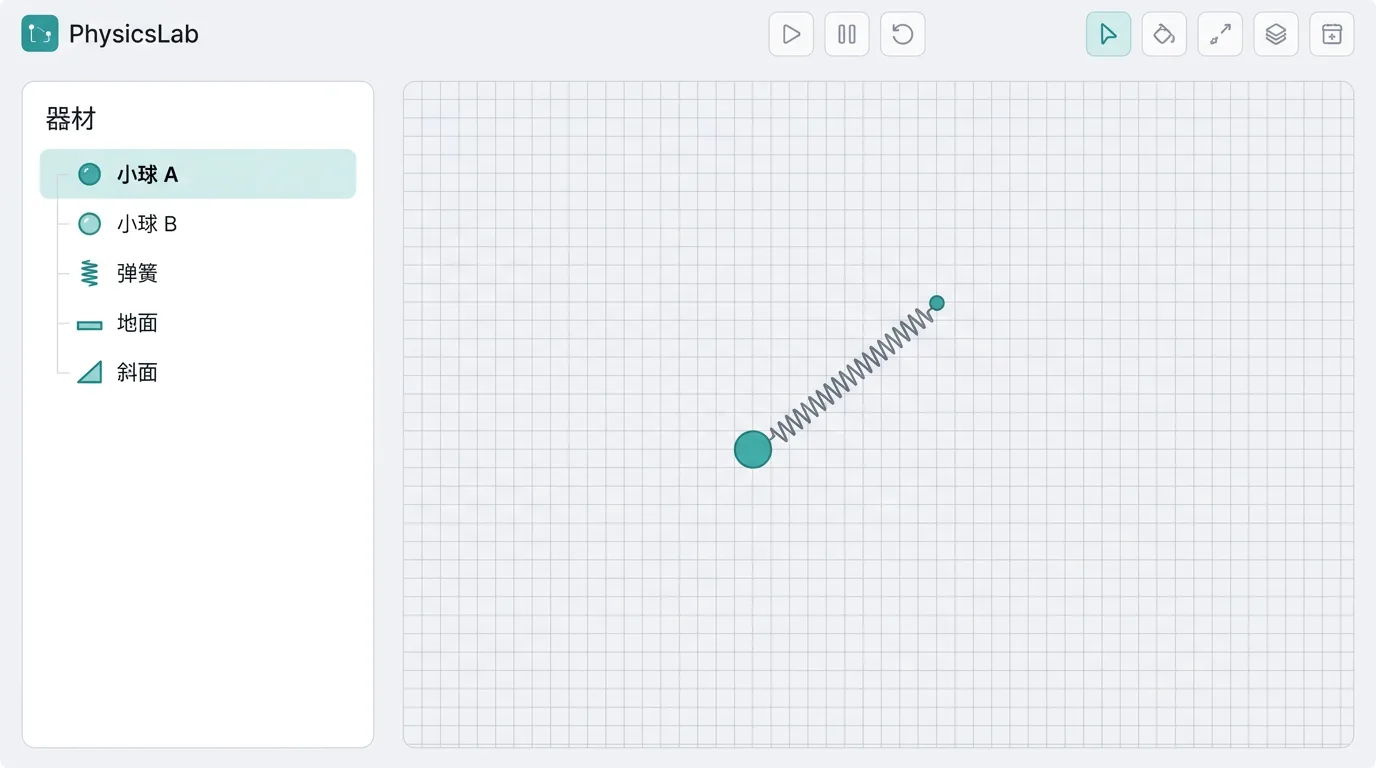
Open the mechanics builder (nav bar → Builder → Mechanics). The object library on the left lists every available entity by category: click one to select it, set its parameters, confirm and it is dropped onto the canvas; after dropping, click "Arrange" to drag it on the canvas. Clicking an entity on the canvas opens its property card on the right, where the parameters can be changed.
Gestures
| Operation | How |
|---|---|
| Move an object | Click "Arrange" to enter edit mode, then press and hold the object and drag it (release to snap it onto the surface it touches) |
| Turn snapping off | Hold Alt while dragging |
| Open properties | In edit mode, single-click the object (its property card opens on the right) |
| Change an incline angle | Select the incline, then drag the handle at its top |
| Change a field region or direction | Select the field, then drag the field handles on the canvas |
| Delete the selection | In edit mode, press Delete or Backspace |
| Cancel a drag | Press Esc while dragging (the object returns to its original place) |
| Play / pause | The space bar, or the play button on the timeline |
A one-line gesture hint always sits in the bottom-right corner of the canvas; glance at it whenever an operation slips your mind.
Detailed Entity Reference
Blocks
Sliding block (block-slide)
A rectangular sliding block that never rotates - the most commonly used base entity. Set the mass and the size and it covers wooden blocks, iron blocks, bricks and the rest.
| Parameter | Symbol | Unit | Range | Default | Notes |
|---|---|---|---|---|---|
| Mass | mass | kg | 0.05–100 | 1 | Affects inertia and weight (the editor accepts wider values; this is the range usually dropped in) |
| Width | width | m | 0.1–2 | 0.4 | Horizontal size |
| Height | height | m | 0.05–1 | 0.24 | Vertical size |
| Initial velocity | vx | m/s | −12–12 | 0 | Positive to the right, negative to the left |
Used for: blocks on inclines, friction experiments, collisions, the sliding block in the block-on-plank model.
Note: the sliding block does not rotate. To watch toppling or flipping, use the toppling rigid block.
Toppling rigid block (block-rigid)
A rigid block that is allowed to rotate, with an angular degree of freedom. For toppling, flipping and other situations that need angular momentum.
| Parameter | Symbol | Unit | Range | Default | Notes |
|---|---|---|---|---|---|
| Mass | mass | kg | 0.2–20 | 1 | — |
| Width | width | m | 0.1–1 | 0.2 | — |
| Height | height | m | 0.2–1.5 | 0.8 | The larger the height-to-width ratio, the easier it topples |
Demo idea: set a height-to-width ratio above 2, place the block on an accelerating platform, and watch it start to topple at the critical acceleration .
Long plank (plank-long)
The long board of the block-on-plank model; it can carry sliding blocks. Used with a block it produces two friction layers, top and bottom.
| Parameter | Symbol | Unit | Range | Default | Notes |
|---|---|---|---|---|---|
| Mass | mass | kg | 0.5–20 | 2 | — |
| Length | length | m | 1–6 | 3 | The block must not overhang the ends of the plank |
Demo idea: it is more convenient to use the block-on-plank kit (which sets up both friction layers for you). Building it by hand means setting friction coefficients on the block and on the plank separately.
Particle (particle-point)
An ideal particle: no size, no rotation. Suited to charged particles moving in electric and magnetic fields, and to idealised collisions.
| Parameter | Symbol | Unit | Range | Default | Notes |
|---|---|---|---|---|---|
| Mass | mass | kg | 0.01–10 | 1 | — |
| Initial velocity x | vx | m/s | −20–20 | 0 | Horizontal component |
| Initial velocity y | vy | m/s | −20–20 | 0 | Vertical component (positive = upward) |
Note: a particle has no collision volume, so two particles pass straight through each other. For collision effects use a ball.
Trapezoid block (block-trapezoid)
A trapezoid block that can translate (narrow at the top and wide at the bottom, or the other way round), with adjustable mass, top and bottom widths and height. Translation only - it does not rotate.
| Parameter | Symbol | Unit | Range | Default | Notes |
|---|---|---|---|---|---|
| Bottom width | bottomW | m | 0.4–3 | 1.2 | — |
| Top width | topW | m | 0.2–2 | 0.6 | May be larger than the bottom width (inverted trapezoid) |
| Height | height | m | 0.2–2 | 0.8 | — |
| Mass | mass | kg | 0.1–20 | 2 | — |
Balls
Ball · Translating (ball-trans)
A point-mass ball that only translates: it has a radius (used for collision detection) but does not rotate. It may carry a charge.
| Parameter | Symbol | Unit | Range | Default | Notes |
|---|---|---|---|---|---|
| Mass | mass | kg | 0.001–30 | 0.5 | — |
| Radius | radius | m | 0.02–0.5 | 0.1 | Sets the contact distance in collisions |
| Charge | chargeUC | μC | −100–100 | 0 | 0 = uncharged; positive = positive charge |
| Initial velocity x | vx | m/s | −30–30 | 0 | — |
| Initial velocity y | vy | m/s | −30–30 | 0 | — |
Used for: projectile motion, collisions (set the restitution coefficient), charged particles moving in an electric or magnetic field.
Demo note: a charged ball needs a uniform electric field or uniform magnetic field entity before any electromagnetic force appears. With charge 0 the fields do nothing to it.
Solid sphere · Can roll (ball-rolling)
A solid sphere with a moment of inertia () that rolls without slipping once the friction is large enough.
| Parameter | Symbol | Unit | Range | Default | Notes |
|---|---|---|---|---|---|
| Mass | mass | kg | 0.2–15 | 1 | — |
| Radius | radius | m | 0.05–0.4 | 0.15 | — |
| Initial velocity | vx | m/s | −10–10 | 0 | — |
Demo idea: release the solid sphere and a sliding block from the top of the same incline (same ) and watch the sphere roll down more slowly, because part of the energy goes into rotational kinetic energy.
Light ball · Air drag (ball-drag)
Carries its own quadratic air drag , suited to table-tennis balls, skydiving terminal-speed problems and the like.
| Parameter | Symbol | Unit | Range | Default | Notes |
|---|---|---|---|---|---|
| Mass | mass | kg | 0.002–5 | 0.0027 | The default is about the mass of a table-tennis ball |
| Radius | radius | m | 0.02–0.2 | 0.02 | Sets the frontal area |
| Drag coefficient | dragCoef | — | 0.2–1.5 | 0.5 | About 0.47 for a sphere |
Demo idea: release it from a height and watch the velocity-time graph accelerate first and then settle onto the terminal speed .
Discs and Rings
Disc / ring (disk-roll)
Choose a disc () or a ring (); they roll down with different accelerations.
| Parameter | Symbol | Unit | Range | Default | Notes |
|---|---|---|---|---|---|
| Mass | mass | kg | 0.2–10 | 1 | — |
| Radius | radius | m | 0.05–0.5 | 0.15 | — |
| Type | hoop | — | 0–1 | 0 | 0 = disc, 1 = ring |
Demo idea: let a disc and a ring roll down the incline together; the disc arrives first ().
Flywheel · Fixed axle (flywheel)
A disc rotating about a fixed axis through its centre, with an initial angular velocity. Suited to rotational kinetic energy and conservation of angular momentum.
| Parameter | Symbol | Unit | Range | Default | Notes |
|---|---|---|---|---|---|
| Mass | mass | kg | 0.5–20 | 3 | — |
| Radius | radius | m | 0.1–0.8 | 0.3 | — |
| Initial angular velocity | omega | rad/s | −20–20 | 5 | Positive = counterclockwise |
Carts
Cart (cart-slide)
A cart that slides horizontally (drawn with wheels); the wheel masses are ignored.
| Parameter | Symbol | Unit | Range | Default | Notes |
|---|---|---|---|---|---|
| Mass | mass | kg | 0.05–200 | 1 | — |
| Length | length | m | 0.3–1.5 | 0.5 | — |
| Initial velocity | vx | m/s | −12–12 | 0 | — |
Flatbed cart (cart-flatbed)
A flatbed cart whose deck can carry objects. A block resting on the deck is coupled to the cart by friction.
| Parameter | Symbol | Unit | Range | Default | Notes |
|---|---|---|---|---|---|
| Mass | mass | kg | 1–50 | 4 | — |
| Plank length | deckLength | m | 0.8–4 | 1.8 | — |
| Deck top height | deckTop | m | 0.2–1.5 | 0.5 | — |
| Initial velocity | vx | m/s | −8–8 | 0 | — |
Inclines and Wedges
Fixed incline (incline-fixed)
A fixed wedge-shaped incline that never moves.
| Parameter | Symbol | Unit | Range | Default | Notes |
|---|---|---|---|---|---|
| Angle | angleDeg | ° | 5–70 | 37 | 30°/37°/45°/53° are the usual exam values |
| Base width | width | m | 1–8 | 3 | Horizontal span of the incline |
| Rises right | riseRight | — | 0–1 | 0 | 0 = high on the left and low on the right, 1 = high on the right and low on the left |
Movable wedge (wedge-free)
A wedge that slides freely on the ground. For momentum-conservation problems with a "moving incline".
| Parameter | Symbol | Unit | Range | Default | Notes |
|---|---|---|---|---|---|
| Mass | mass | kg | 0.5–30 | 5 | The heavier it is, the harder it is to push |
| Base width | width | m | 1–5 | 3 | — |
| Height | height | m | 0.5–3 | 2 | — |
Demo idea: let a ball slide down from the top of the wedge and watch the wedge slide the other way (horizontal momentum is conserved).
Infinite inclined plane (incline-surface)
An incline with no edges, suited to long runs of relative motion.
| Parameter | Symbol | Unit | Range | Default | Notes |
|---|---|---|---|---|---|
| Angle | angleDeg | ° | 5–75 | 30 | — |
Quarter-circle incline (quarter-incline)
A fixed quarter-circle slide: an isosceles right wedge with a quarter of a circle cut out (the surface is a true arc - analytic collision handling plus smooth rendering). A block released from rest at the top speeds up along the arc and leaves the bottom, where the tangent is horizontal, as a horizontal projectile - the exact setting for "circular slide plus projectile" problems. Untick fixed and give it a mass to build momentum/energy-conservation problems of the "slide on a frictionless surface, the sliding block pushes the slide along" type (it becomes a translating body by default; if you need the slide itself to rotate, switch to a planar rigid body with a uniform area mass distribution).
| Parameter | Symbol | Unit | Range | Default | Notes |
|---|---|---|---|---|---|
| Radius | R | m | 0.4–4 | 1.2 | The side length of the wedge equals the arc radius |
| Rises right | riseRight | — | 0–1 | 1 | 0 = rises to the left (high on the left, low on the right), 1 = rises to the right (high on the right, low on the left) |
Ground and Surroundings
Horizontal ground (ground-std)
The standard horizontal ground, normal pointing upward. No parameters. Most scenes already have a ground by default, so you do not need to add one.
Ceiling (ceiling)
A fixed plane above the scene, for suspended or inverted setups.
| Parameter | Symbol | Unit | Range | Default | Notes |
|---|---|---|---|---|---|
| Height | height | m | 1–10 | 4 | Height above the ground |
Vertical wall (wall)
A fixed vertical wall.
| Parameter | Symbol | Unit | Range | Default | Notes |
|---|---|---|---|---|---|
| Position x | x | m | −10–10 | −4 | Negative = left side, positive = right side |
| Height | height | m | 0.5–6 | 2 | — |
Elevated platform (shelf)
A fixed horizontal surface (a tabletop or a ledge); objects can be projected from its edge.
| Parameter | Symbol | Unit | Range | Default | Notes |
|---|---|---|---|---|---|
| Width | width | m | 0.5–6 | 2 | — |
| Deck top height | height | m | 0.3–5 | 1 | The launch height for horizontal projection |
Demo idea: launch a ball horizontally from the edge of the platform → horizontal projectile motion.
Kinematic platform (platform-kinematic)
A lift or an accelerating carriage. It moves according to the velocity and acceleration you give it and feels no forces itself.
| Parameter | Symbol | Unit | Range | Default | Notes |
|---|---|---|---|---|---|
| Width | width | m | 0.5–5 | 2 | — |
| Initial velocity x | vx | m/s | −5–5 | 0 | — |
| Initial velocity y | vy | m/s | −5–5 | 0 | Initial velocity of the lift |
| Acceleration x | ax | m/s² | −10–10 | 0 | — |
| Acceleration y | ay | m/s² | −10–10 | 0 | Positive = accelerating upward (overweight) |
Demo ideas:
- Overweight: , apparent weight of an object on the platform
- Weightlessness: ,
- Complete weightlessness: ,
Zoned friction surface (zoned-surface)
A horizontal surface made of two joined sections with different friction coefficients.
| Parameter | Symbol | Unit | Range | Default | Notes |
|---|---|---|---|---|---|
| Left length | leftLen | m | 1–8 | 4 | — |
| Right length | rightLen | m | 1–8 | 4 | — |
| Left kinetic friction | muLeft | — | 0–1 | 0.01 | Almost frictionless |
| Right kinetic friction | muRight | — | 0–1 | 0.5 | Rough |
| Deck top height | topHeight | m | 0.1–2 | 0.2 | — |
Demo idea: send the block from the smooth section into the rough one and watch the acceleration jump at the seam.
Tracks and Arc Surfaces
Friction semantics: while an object simply touches the rail and slides on it, the friction μ of the contact pair (object ↔ track) applies. If instead you bind the object to the rail with "Connections → Path", the rail is always frictionless (μ does nothing), and the restitution e of the contact pair only matters at collision instants such as falling back onto the rail after derailing.
Half bowl · Inner rail (bowl-half)
Superseded by the custom arc segment (start angle 180° + sweep angle 180° + inner rail); it is no longer listed in the panel, but old scenes still run. The table below is kept for reference.
A half circle with an inner rail; the ball moves back and forth inside the bowl.
| Parameter | Symbol | Unit | Range | Default | Notes |
|---|---|---|---|---|---|
| Radius | radius | m | 0.5–4 | 1.5 | Radius of curvature of the bowl |
Half hill · Outer rail (hill-half)
Superseded by the custom arc segment (start angle 0° + sweep angle 180° + outer rail); it is no longer listed in the panel, but old scenes still run. The table below is kept for reference.
A hump-backed bridge with an outer rail, for studying the condition for leaving the track (flying off).
| Parameter | Symbol | Unit | Range | Default | Notes |
|---|---|---|---|---|---|
| Radius | radius | m | 0.5–4 | 1.5 | — |
Demo idea: run a ball down from a height onto the top of the hump; it flies off once ().
Vertical circular track (loop-vertical)
A complete vertical circular track.
| Parameter | Symbol | Unit | Range | Default | Notes |
|---|---|---|---|---|---|
| Radius | radius | m | 0.5–3 | 1 | — |
| Side | side | — | 0–2 | 0 | 0 = inner rail, 1 = outer rail, 2 = tube with both sides |
Demo ideas:
- Inner rail (side=0): the ball moves on the inside of the track, with a critical speed at the top of
- Tube with both sides (side=2): the ball cannot leave the track, so any speed can be studied
Custom arc segment (arc-custom)
An arc whose start angle and sweep angle you choose; the collision face can be the inner rail (bowl/groove) or the outer rail (bridge/hump), so both the half bowl and the half hill can be drawn with it.
| Parameter | Symbol | Unit | Range | Default | Notes |
|---|---|---|---|---|---|
| Radius | radius | m | 0.3–4 | 1.2 | — |
| Start angle | startDeg | ° | 0–360 | 180 | 0° = due right, counterclockwise |
| Sweep angle | sweepDeg | ° | 30–360 | 120 | 180 = half circle, 360 = full circle |
| Collision face | side | — | 0–1 | 0 | 0 = inner rail, 1 = outer rail |
Straight track segment (track-segment)
A straight track of finite length with an adjustable angle.
| Parameter | Symbol | Unit | Range | Default | Notes |
|---|---|---|---|---|---|
| Length | length | m | 0.5–8 | 3 | — |
| Angle | angleDeg | ° | −80–80 | 0 | 0 = horizontal |
Containers and Frames
U-shaped tray (tray-u)
An open container made of a floor plus two walls; inner width, wall height and wall thickness are adjustable, and the friction of the floor and of the side walls can be set separately.
| Parameter | Symbol | Unit | Range | Default | Notes |
|---|---|---|---|---|---|
| Inner width | width | m | 0.5–4 | 2 | Distance between the inner faces of the walls |
| Wall height | wallH | m | 0.2–2 | 0.6 | — |
| Wall thickness | thickness | m | 0.04–0.2 | 0.1 | Floor and side walls share this thickness |
| Floor kinetic friction | muFloor | — | 0–1 | 0.3 | — |
| Wall kinetic friction | muWall | — | 0–1 | 0.1 | — |
Open box (box-open)
A movable open box that can hold contents and take part in collisions; wall height, wall thickness and inner width are adjustable and stay editable after the box has been dropped (connections and references to it are preserved), and the friction of the floor and of the side walls can be set separately.
| Parameter | Symbol | Unit | Range | Default | Notes |
|---|---|---|---|---|---|
| Mass | mass | kg | 0.5–20 | 2 | — |
| Inner width | width | m | 0.3–2 | 0.6 | Distance between the inner faces of the walls |
| Wall height | wallH | m | 0.2–1.5 | 0.4 | — |
| Wall thickness | thickness | m | 0.04–0.2 | 0.08 | Floor and side walls share this thickness |
| Floor kinetic friction | muFloor | — | 0–1 | 0.3 | — |
| Wall kinetic friction | muWall | — | 0–1 | 0.1 | — |
Block with a half-circle groove (block-halfcircle-groove)
A fixed rectangular block with a half-circle groove cut in the middle of its top face (the groove surface is a true arc - analytic collision handling plus smooth rendering); for problems where a ball rolls or slides inside the groove. Width, height and groove radius are adjustable. Untick fixed and give it a mass to build momentum/energy-conservation problems of the "block on a frictionless surface, the ball swinging in the groove pushes the block along" type (it becomes a translating body by default; if you need the block itself to rotate, switch to a planar rigid body with a uniform area mass distribution).
| Parameter | Symbol | Unit | Range | Default | Notes |
|---|---|---|---|---|---|
| Width | W | m | 1.2–4 | 2.4 | — |
| Height | H | m | 0.6–2 | 0.8 | — |
| Groove radius | r | m | 0.15–0.5 | 0.3 | The half-circle groove opens at the middle of the top face |
L-shaped step block (block-step-l)
A fixed L-shaped step: a long lower bar with a raised block on the left, for problems where a block slides up onto the step or strikes its face.
| Parameter | Symbol | Unit | Range | Default | Notes |
|---|---|---|---|---|---|
| Base width | W | m | 0.8–3 | 1.6 | — |
| Base height | h1 | m | 0.2–1.2 | 0.4 | — |
| Step width | w2 | m | 0.3–0.8 | 0.5 | Sits on the left side |
| Step height | h2 | m | 0.2–1.2 | 0.6 | — |
Custom-Drawn Shapes
Draw a track
The "Draw a track" entry in the left-hand library: draw an open polyline (it may be concave, may carry circular arcs, and can be closed into a loop) as a fixed track or slope along whose surface objects slide and collide; "Connections → Path" binds an object to the rail so it slides without friction. The "Re-edit shape" button on the card sends it back to the drawing board at any time.
Draw a rigid body
The "Draw a rigid body" entry in the left-hand library: draw a convex polygon (edges may be circular arcs; arcs are stored as true arcs and the engine collides against the arc; when you re-edit you can flatten an arc back or drag its peak), or use the circle tool to draw a disc. The result is a dynamic entity that is not fixed - gravity acts on it, it collides, and it can roll.
| Setting | Description |
|---|---|
| Mass | 0.1–100 kg; changing the mass rescales the moment of inertia in proportion |
| Rotation | Can rotate (rigid body) / translation only. The moment of inertia of a rigid body is computed from the drawn geometry (circle = ½mR², polygon by integrating the uniform area distribution) |
The "Re-edit shape" button on the card keeps the id and the constraint references and rebuilds only the geometry.
Machines
Fixed pulley (pulley-fixed)
An ideal fixed pulley, used together with a string. It changes the direction of the force without saving any of it.
| Parameter | Symbol | Unit | Range | Default | Notes |
|---|---|---|---|---|---|
| Radius | radius | m | 0.1–0.6 | 0.25 | Affects the display only |
| Axle height | height | m | 1–8 | 4 | Height above the ground |
Movable pulley (pulley-movable)
A movable pulley with mass that travels with the string. With several rope segments it gives a mechanical advantage.
| Parameter | Symbol | Unit | Range | Default | Notes |
|---|---|---|---|---|---|
| Mass | mass | kg | 0.1–50 | 4 | — |
| Radius | radius | m | 0.1–0.6 | 0.2 | — |
Conveyor belt (belt)
A horizontal or inclined conveyor belt; the belt speed acts along the belt surface.
| Parameter | Symbol | Unit | Range | Default | Notes |
|---|---|---|---|---|---|
| Length | width | m | 2–12 | 6 | — |
| Belt speed | speed | m/s | −8–8 | 2 | Positive = to the right / up the slope |
| Angle | angleDeg | ° | −60–60 | 0 | 0 = horizontal |
Demo ideas:
- Block slower than the belt (initial speed < belt speed): the block is accelerated up to the belt speed (kinetic friction first, then static friction)
- Block faster than the belt: the block is slowed down to the belt speed
- Inclined belt: check whether it can carry the block up (needs )
Rod rotating about a fixed axis (rod-pivot)
A uniform rod rotating about one end (a physical pendulum).
| Parameter | Symbol | Unit | Range | Default | Notes |
|---|---|---|---|---|---|
| Mass | mass | kg | 0.2–10 | 1 | — |
| Rod length | length | m | 0.4–3 | 1.2 | — |
| Initial angle | angleDeg | ° | −90–90 | 0 | Measured from the horizontal |
Connections
Spring (spring)
An elastic constraint joining an anchor to a target entity.
| Parameter | Symbol | Unit | Range | Default | Notes |
|---|---|---|---|---|---|
| Natural length | naturalLength | m | 0.3–3 | 1 | Its length when unstressed |
| Spring constant | k | N/m | 10–500 | 100 | The larger it is, the stiffer the spring and the faster the oscillation |
| Damping coefficient | damping | N·s/m | 0–50 | 0 | 0 = no damping (constant amplitude) |
Demo ideas:
- Damping = 0: watch undamped simple harmonic motion and check
- Damping > 0: watch the amplitude decay (underdamped); the larger the damping, the faster the decay
- Change the mass: as grows, grows too (the period is proportional to )
Light string (rope-light)
A one-way tension constraint: it can pull but not push, and it can go slack.
| Parameter | Symbol | Unit | Range | Default | Notes |
|---|---|---|---|---|---|
| Length | length | m | 0.3–5 | 2 | String length (inextensible) |
| Breaking tension | breakTension | N | 1–200 | Omitted | Omitted = it never breaks; an explicit 0 is rejected by the engine (only tensions > 0 are accepted) |
Note: while the string is slack (the distance between the objects is less than its length) it exerts no force at all. Once a breaking tension is set, the string snaps as soon as the tension exceeds it.
Light rod (rod-light)
A rigid two-way link: it can push and pull and keeps the distance fixed.
| Parameter | Symbol | Unit | Range | Default | Notes |
|---|---|---|---|---|---|
| Length | length | m | 0.3–5 | 1.5 | Rod length (constant) |
Difference from a string: a rod can push (compression), so the object cannot come "off" the rod. Suited to rigid pendulums and link mechanisms.
Ring on a track (track-ring)
A free ring constrained to slide only along a track or rod (a sliding point on the rail). Strings, rods and springs can be attached directly to the ring.
| Parameter | Symbol | Unit | Range | Default | Notes |
|---|---|---|---|---|---|
| Mass | mass | kg | 0.1–10 | 1 | The mass of the ring |
How to use: after placing it, change its track field to the id of the target track or rod and the ring is constrained to slide on that track. Suited to "ring on a rod" problems (a ball carrying a ring sliding down a circular track, or a ring on a rod held by a string).
Fields and Environment
Uniform gravity (gravity)
The global gravity field.
| Parameter | Symbol | Unit | Range | Default | Notes |
|---|---|---|---|---|---|
| Gravitational acceleration | g | m/s² | 0.5–20 | 9.8 | 9.8 on Earth, 1.62 on the Moon; 10 is common in exam questions |
Note: the engine has no built-in gravity. A new scene in the builder comes with a deletable uniform gravity field (g=9.8); when gravity is not wanted (space or complete weightlessness), just delete this field.
Uniform electric field (efield)
A uniform electric field over the whole scene, acting on every charged body.
| Parameter | Symbol | Unit | Range | Default | Notes |
|---|---|---|---|---|---|
| Field strength | E | N/C | 1–500 | 50 | — |
| Direction angle | angleDeg | ° | −180–180 | 0 | 0° = to the right, 90° = upward |
Note: only entities whose charge ≠ 0 feel the field force .
Electric field region · Rectangle (efield-region)
A uniform electric field confined to a finite rectangle; the usual choice for deflection or accelerating sections.
| Parameter | Symbol | Unit | Range | Default | Notes |
|---|---|---|---|---|---|
| Field strength | E | N/C | 1–500 | 50 | — |
| Direction | angleDeg | ° | −180–180 | 0 | — |
| Width | width | m | 1–10 | 4 | Horizontal extent of the region |
| Height | height | m | 1–10 | 3 | Vertical extent of the region |
Demo idea: send a charged particle horizontally into a vertical electric field region → projectile-like motion (deflection).
Radial electric field (radial-efield)
along the radial direction - the principle of an electrostatic analyser.
| Parameter | Symbol | Unit | Range | Default | Notes |
|---|---|---|---|---|---|
| Coefficient A | A | V | 0.5–50 | 4 | When $ |
Uniform magnetic field (bfield)
A uniform magnetic field perpendicular to the page.
| Parameter | Symbol | Unit | Range | Default | Notes |
|---|---|---|---|---|---|
| Magnetic flux density | B | T | −5–5 | 1 | B>0 out of the page (⊙), B<0 into the page (⊗) |
| Width | width | m | 1–12 | 6 | — |
| Height | height | m | 1–12 | 6 | — |
Demo idea: send a charged particle perpendicularly into the field → uniform circular motion with . Change or and watch the radius change.
Circular magnetic field region (bfield-circle)
A bounded circular region of uniform magnetic field.
| Parameter | Symbol | Unit | Range | Default | Notes |
|---|---|---|---|---|---|
| Magnetic flux density | B | T | −5–5 | 1 | — |
| Region radius | radius | m | 0.5–6 | 2 | — |
Triangular magnetic field region (bfield-triangle)
A right-isosceles triangular magnetic field region.
| Parameter | Symbol | Unit | Range | Default | Notes |
|---|---|---|---|---|---|
| Magnetic flux density | B | T | −5–5 | 1 | — |
| Leg length | leg | m | 1–8 | 4 | — |
Annular magnetic field region (bfield-annulus)
An annular (doughnut-shaped) uniform magnetic field: the particle feels the Lorentz force only inside the ring band where inner radius ≤ distance to the centre ≤ outer radius. An approximation of an annular deflector or a cyclotron chamber; an inner radius of 0 degenerates into a disc.
| Parameter | Symbol | Unit | Range | Default | Notes |
|---|---|---|---|---|---|
| Magnetic flux density | B | T | −5–5 | 1 | — |
| Inner radius | innerRadius | m | 0–10 | 0.3 | 0 = solid disc |
| Outer radius | outerRadius | m | 0.1–10 | 0.8 | Must be greater than the inner radius |
Sector-shaped field region (sector-field)
A sector (central angle ≤ 180°) of uniform electric or magnetic field: the start angle gives the direction of the opening edge (radians, positive counterclockwise) and the central angle gives the swept range. The direct way to express real exam questions with sector-shaped field regions. Choose "Sector" under "Region" on the field card, or use the "Sector-shaped field region" template directly.
Custom-drawn field region
On any field card click "Draw field region": outline a polygon on the drawing board as the region this field acts in (it may be concave but must not self-intersect; edges may be circular arcs, stored as true arcs, and the engine uses the arc when deciding the boundary; when you re-edit you can flatten an arc back or drag its peak). Saving replaces the previous region settings, and the field only affects objects inside the region. With the field selected you can also drag the region's vertices or its centre straight on the canvas. The direction symbols inside the field (electric-field arrows, magnetic ⊗⊙) are laid out to suit the shape of the region: along concentric rings for circles and annuli, radially for sectors, evenly filling a drawn polygon.
Switched magnetic field (bfield-switched)
A magnetic field that is removed suddenly at the instant you set. For combined-field problems in which B is taken away.
| Parameter | Symbol | Unit | Range | Default | Notes |
|---|---|---|---|---|---|
| Magnetic flux density | B | T | −5–5 | 1 | — |
| Field-off time | offAt | s | 0.2–5 | 1 | At this instant B jumps to 0 |
Fixed point charge · Field source (charge-source)
A fixed source charge producing the point-charge field .
| Parameter | Symbol | Unit | Range | Default | Notes |
|---|---|---|---|---|---|
| Charge | chargeUC | μC | −50–50 | 5 | Positive = positive charge |
Air medium (air-medium)
Air throughout the scene, supplying drag and a wind speed.
| Parameter | Symbol | Unit | Range | Default | Notes |
|---|---|---|---|---|---|
| Density | density | kg/m³ | 0.1–5 | 1.2 | Standard air is 1.2 |
| Wind speed | vx | m/s | −15–15 | 0 | Positive = wind blowing to the right |
Celestial Bodies
Celestial body (celestial-body)
A spherical celestial body, usable as a gravity source or as an orbiting body.
| Parameter | Symbol | Unit | Range | Default | Notes |
|---|---|---|---|---|---|
| Mass | mass | kg | 0.01–1000 | 1 | Simulation units (not real kg) |
| Radius | radius | m | 0.05–2 | 0.3 | — |
| Gravitational parameter GM | mu | m³/s² | 0–5000 | 500 | Sets the strength of the gravity |
| As gravity source | isSource | — | 0–1 | 1 | 1 = produces a gravitational field, 0 = only feels one |
Demo idea: make one large body the source (isSource=1) and a small one a test body (isSource=0), give the small body an initial speed perpendicular to the line joining them, and watch a circular orbit. Too fast → an ellipse, too slow → it falls in.
Ready-Made Kits
Kits are preset combinations of several entities: one click adds the whole group, so you do not have to build it by hand.
Atwood machine (kit-atwood)
Two connected bodies on the two sides of a fixed pulley.
| Parameter | Symbol | Unit | Range | Default | Notes |
|---|---|---|---|---|---|
| Mass on the left | m1 | kg | 0.2–10 | 1 | — |
| Mass on the right | m2 | kg | 0.2–10 | 2 | — |
| Axle height | height | m | 2–8 | 4.2 | — |
Physics: ,
Block-on-plank kit (kit-boardblock)
A block sliding onto a long plank, with both friction layers included.
| Parameter | Symbol | Unit | Range | Default | Notes |
|---|---|---|---|---|---|
| Block mass | blockMass | kg | 0.2–5 | 1 | — |
| Plank mass | plankMass | kg | 0.5–8 | 2 | — |
| Block initial speed | v0 | m/s | 1–10 | 4 | — |
| Block-plank friction | muTop | — | 0.05–1 | 0.3 | Between the block and the plank |
| Plank-ground friction | muBottom | — | 0–1 | 0.1 | Between the plank and the ground |
Head-on carts (kit-collision)
Two carts running towards each other, with adjustable restitution.
| Parameter | Symbol | Unit | Range | Default | Notes |
|---|---|---|---|---|---|
| Cart 1 mass | m1 | kg | 0.2–10 | 1 | — |
| Cart 2 mass | m2 | kg | 0.2–10 | 2 | — |
| Cart 1 speed | v1 | m/s | 0.5–8 | 3 | To the right |
| Cart 2 speed | v2 | m/s | 0.5–8 | 1 | To the left |
| Restitution coefficient | e | — | 0–1 | 1 | 1 = elastic, 0 = perfectly inelastic |
Velocity selector (kit-vsel)
Crossed E and B fields plus a charged particle.
| Parameter | Symbol | Unit | Range | Default | Notes |
|---|---|---|---|---|---|
| Electric field strength | E | N/C | 10–500 | 100 | — |
| Magnetic flux density | B | T | 0.1–5 | 2 | — |
| Particle mass | massMG | mg | 1–100 | 10 | — |
| Charge | chargeUC | μC | 1–100 | 20 | — |
Physics: the selected speed is . A particle entering at this speed passes straight through; faster or slower and it is deflected.
Horizontal turntable · Top view (kit-turntable)
A block on a turntable seen from above, with friction supplying the centripetal force.
| Parameter | Symbol | Unit | Range | Default | Notes |
|---|---|---|---|---|---|
| Angular velocity ω | omega | rad/s | 0.5–6 | 2 | — |
| Placement radius | r | m | 0.3–3 | 1 | — |
| Static friction μs | muS | — | 0.05–1 | 0.5 | — |
| Kinetic friction μk | muK | — | 0.05–1 | 0.4 | — |
| Effective g | g | m/s² | 1–15 | 9.8 | — |
Physics: the critical condition is . Beyond the critical radius the block is flung off.
Note: this is a top-view scene, so do not add gravity or a ground entity.
Bullet into a block (kit-bulletblock)
The classic perfectly inelastic collision / penetration problem.
| Parameter | Symbol | Unit | Range | Default | Notes |
|---|---|---|---|---|---|
| Bullet initial speed | v0 | m/s | 50–500 | 300 | — |
| Bullet mass | bulletMass | kg | 0.005–0.1 | 0.02 | — |
| Block mass | blockMass | kg | 0.2–5 | 1 | — |
| Penetration resistance f | resistance | N | 100–12000 | 6000 | Large = it embeds, small = it passes clean through |
| Block width | blockWidth | m | 0.2–1 | 0.4 | — |
Demo ideas:
- Large resistance (6000 N): the bullet embeds and both move together at
- Small resistance (500 N): the bullet punches right through and the block gains only a small speed
Incline + block kit (kit-incline-block)
A fixed incline plus a block, built in one click.
| Parameter | Symbol | Unit | Range | Default | Notes |
|---|---|---|---|---|---|
| Angle | angleDeg | ° | 15–60 | 37 | — |
| Mass | mass | kg | 0.2–10 | 1 | — |
| Static friction | muS | — | 0–1.2 | 0.4 | — |
| Kinetic friction | muK | — | 0–1.2 | 0.3 | — |
Table-pulley connected bodies (kit-table-pulley)
A block on the table joined to a hanging weight over a pulley at the table edge.
| Parameter | Symbol | Unit | Range | Default | Notes |
|---|---|---|---|---|---|
| Block on the table | mTable | kg | 0.2–10 | 2 | — |
| Hanging weight | mHang | kg | 0.2–10 | 1 | — |
| Table friction | mu | — | 0–1 | 0.1 | — |
Binary star pair (kit-binary-star)
Two stars orbiting each other, with the circular-orbit speeds set up automatically.
| Parameter | Symbol | Unit | Range | Default | Notes |
|---|---|---|---|---|---|
| Star 1 mass | m1 | kg | 1–100 | 10 | — |
| Star 2 mass | m2 | kg | 1–100 | 10 | — |
| Separation | d | m | 1–8 | 3 | — |
| Gravitational constant | G | sim | 0.001–1 | 0.05 | Simulation units |
Belt / gear drive (kit-belt-drive)
Two wheels coupled by their rim speed: .
| Parameter | Symbol | Unit | Range | Default | Notes |
|---|---|---|---|---|---|
| Wheel A radius | radiusA | m | 0.1–1.5 | 0.3 | — |
| Wheel B radius | radiusB | m | 0.1–1.5 | 0.15 | — |
| Wheel A initial angular velocity | omegaA | rad/s | −20–20 | 4 | — |
| Crossed / meshed | crossed | — | 0–1 | 0 | 0 = same direction (belt), 1 = opposite direction (gears) |
Two-rope suspension (kit-two-ropes)
A static-equilibrium kit hung symmetrically by two links.
| Parameter | Symbol | Unit | Range | Default | Notes |
|---|---|---|---|---|---|
| Mass | mass | kg | 0.5–20 | 3 | The suspended weight |
| Half span | span | m | 0.5–3 | 1.2 | Horizontal distance from an anchor point to the position directly above the weight |
| Anchor height difference | height | m | 0.5–3 | 1.5 | Vertical distance by which the anchor points stand above the weight |
Used for: practising the resolution of three-force equilibrium (two string tensions plus gravity). Move the anchor points and watch how the tension is shared between the two strings.
Constant-torque disc on a fixed axis (kit-torque-disk)
A disc rotating about a fixed axis under a constant torque: .
| Parameter | Symbol | Unit | Range | Default | Notes |
|---|---|---|---|---|---|
| Mass | mass | kg | 0.5–8 | 2 | — |
| Radius | radius | m | 0.2–1.5 | 0.5 | — |
| Torque | torque | N·m | 0.1–5 | 0.5 | The constant external torque |
Used for: uniformly accelerated rotation (, ) and checking the moment of inertia .
Block under a varying F-x force (kit-fx-block)
A frictionless block under a force that depends on position: a constant force pushes it as far as , after which the force falls linearly to 0 (at ). The work done equals the area under the F-x graph.
| Parameter | Symbol | Unit | Range | Default | Notes |
|---|---|---|---|---|---|
| Mass | mass | kg | 0.5–5 | 1 | — |
| Plateau force | F0 | N | 2–30 | 10 | The size of the force in the constant-force section |
| End of constant force | xFlat | m | 0.5–4 | 2 | The constant force acts up to here |
| Zero position | xEnd | m | 1–8 | 4 | Where the force has fallen linearly to 0 |
Used for: work done by a varying force (the area-under-the-graph method) and the work-energy theorem . Best watched together with the - graph.
Pulley block · one fixed and one movable (kit-pulley-block)
One fixed and one movable pulley plus a counterweight: two rope segments carry the movable pulley, and the system balances when the counterweight equals half the load (half the force).
| Parameter | Symbol | Unit | Range | Default | Notes |
|---|---|---|---|---|---|
| Load | mass | kg | 0.5–50 | 4 | The weight hanging from the movable pulley |
| Counterweight | counterMass | kg | 0.1–50 | 2 | The weight at the rope end (balance at load/2) |
| Pulley radius | radius | m | 0.1–0.4 | 0.2 | The radius of both pulleys |
| Top height | height | m | 2–10 | 5 | The height of the fixed pulley / fixed end |
Used for: the mechanical advantage of a pulley block () and the relation between the speed of the rope end and the speed of the load ().
Simple pendulum kit (kit-pendulum)
Pivot + light string + bob: the spot you drop it at becomes the pivot, the bob is placed from the pendulum length and the initial angle, and the string length is set up for you.
| Parameter | Symbol | Unit | Range | Default | Notes |
|---|---|---|---|---|---|
| Bob mass | m | kg | 0.1–10 | 1 | — |
| Length | L | m | 0.5–4 | 2 | From the pivot to the centre of the bob |
| Initial angle | theta0 | ° | −90–90 | 30 | 0 = the lowest point, positive = displaced to the right |
Demo idea: at small angles (≤ 10°) the swing is approximately simple harmonic, with period independent of mass and amplitude; at large angles watch the period grow.
Events and Actions
Many exam questions change in stages: a string cut at some instant, friction that jumps after a collision, a force that appears once the particle is inside a magnetic field... Express such changes as an event (when it fires) → an action (what changes). Set them up on the "Events" tab on the right:
- Add an event: pick the trigger condition (see the list below) and fill in its parameter (for example the time 2.0 s)
- Attach actions to the event: pick the action type and fill in its parameters (for example "Release connection (cut)" with target = the id of the string)
Common trigger conditions: At time (at_time), First contact (first_contact), Contact lost (contact_lost), Speed reaches zero (speed_zero), Highest point (apex), Reaches position (position_reached), Bodies reach a common speed (relative_speed_zero, usual in block-on-plank problems), String turns taut (string_taut), Enters field region / Leaves field region (enter_field / leave_field), Spring back to natural length (spring_natural_length).
Common actions: Release connection (cut a string or rod), Activate connection, Explode apart, Sudden charging (switching on charge in an electromagnetic problem), Change belt speed, Change friction, Change connection length (hauling a string in or out), Open the parachute (changing the drag area), Change gravity, Record stage, Stop the run.
A typical case - "a ball hung by a light string, the string is cut after 2 s":
- Event: At time, t = 2.0 s
- Action: Release connection (cut), target = that string
Wrapping a String over a Pulley
An ordinary light string only joins its two ends directly. To run a string across a pulley (changing its direction), use a pulley-wrapped string: fill the string's pulleys list in the order of wrapping with pulley ids and wrap directions (clockwise / counterclockwise), and the engine works out the wrap angle and the total length for you. Kits such as the pulley block and the Atwood machine already have this configured - load the kit first, then change the parameters.
Using the Lab
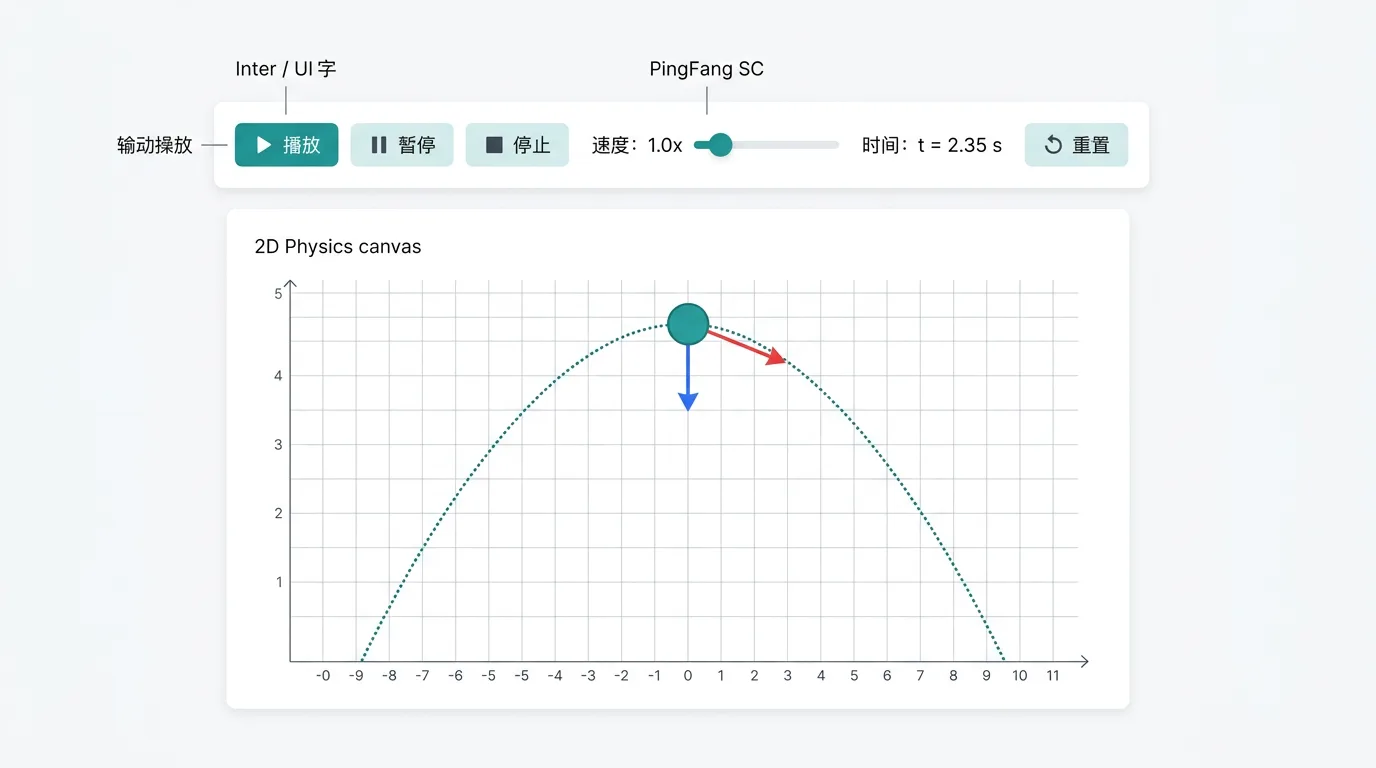
Click "Run it" to enter the lab:
- Play / pause: the space bar or the button
- Speed: 0.25× / 0.5× / 1× / 2×
- Timeline: drag to jump; event points (collisions, the highest point) are marked with diamonds
- Display overlays: force vectors, velocity vectors, acceleration vectors, trajectory, labels, grid
- Data charts: -, -, -, the energy chart, the event table
- Parameter scan: change one parameter and observe how the result changes
- Solve for a parameter: set a target value and the system works the parameter back out
Common Problems and Cautions
- Objects interpenetrating: two objects that start out overlapping produce abnormal forces. Leave a gap when you place them.
- Time step: high-speed collisions or a very stiff spring () may need a smaller step. If the energy jumps, lower the step in the scene settings.
- Friction doing nothing: friction needs contact (). An object in mid-air feels no friction.
- String versus rod: a string only pulls (no force while it is slack); a rod pulls and pushes (it always maintains the distance).
- Charge equal to 0: electric and magnetic fields do nothing to an uncharged object. Set a non-zero charge first.
- Universal gravitation and the Coulomb force are off by default: both are forces between pairs of objects, so they only take effect once you add the matching entry under "Interactions" in the builder; the Coulomb force also needs the objects involved to carry a non-zero charge. The binary star pair kit sets up universal gravitation for you.
- Gravity is configured per scene: the engine has no built-in gravity; a new scene in the builder comes with a deletable uniform gravity field (g=9.8). Do not add gravity to top-view scenes (such as the horizontal turntable), and leaving every field out gives complete weightlessness.
- Drag needs a medium: drag parameters on an object take effect only once you add an air / medium entity.
- Top-view kits: the horizontal turntable is a top-view scene, so do not add gravity or a ground on top of it.
- Prefer a kit: when your experiment matches a kit (the Atwood machine, the block-on-plank kit), use the kit instead of building it by hand, so that no constraint is missed.
Teaching Suggestions
- Newton's second law: use the table-pulley connected bodies and change the hanging mass to observe the acceleration.
- Conservation of mechanical energy: use the vertical circular track (side=2), read the speed at each position and check .
- Collisions: use the head-on carts and sweep from 1 down to 0, comparing momentum conservation with the change in kinetic energy.
- The block-on-plank model: use the block-on-plank kit and watch the block slow down, the plank speed up, and the pair end up at a common speed.
- Electromagnetic deflection: a ball (given a charge) plus an electric field region → projectile-like motion; plus a magnetic field → circular motion.
- Conveyor belts: give the block an initial speed different from the belt speed and watch it accelerate or decelerate before settling into uniform motion.
Related Experiments
- Uniformly accelerated straight-line motion: check
- Free fall: check and that does not depend on mass
- Newton's second law: use the control-variable method to check and
- Horizontal projection: resolve it into uniform horizontal motion plus vertical free fall
- Verifying conservation of mechanical energy: a smooth incline or a circular track
- Collisions and momentum conservation: elastic and inelastic collisions
- Circular motion and centripetal force: a ball on a string, a vertical circular track
- The spring oscillator: check