Thermal Teaching Guide
Conceptual Foundations
Ideal Gas Equation of State
pressure (Pa), volume (m³), amount of substance (mol), , thermodynamic temperature (K).
Four Typical Processes
| Process | Condition | Process equation | Features |
|---|---|---|---|
| Isothermal | constant | , | |
| Isobaric | constant | ||
| Isochoric | constant | , | |
| Adiabatic | heats up on compression, cools down on expansion |
: 5/3 for a monatomic gas, 7/5 for a diatomic gas.
First Law of Thermodynamics
: the gas does work on the surroundings (expansion). : heat absorbed.
p-V Diagram
The area under a process curve = work . A clockwise cycle = heat engine (net work positive).
Using the Builder
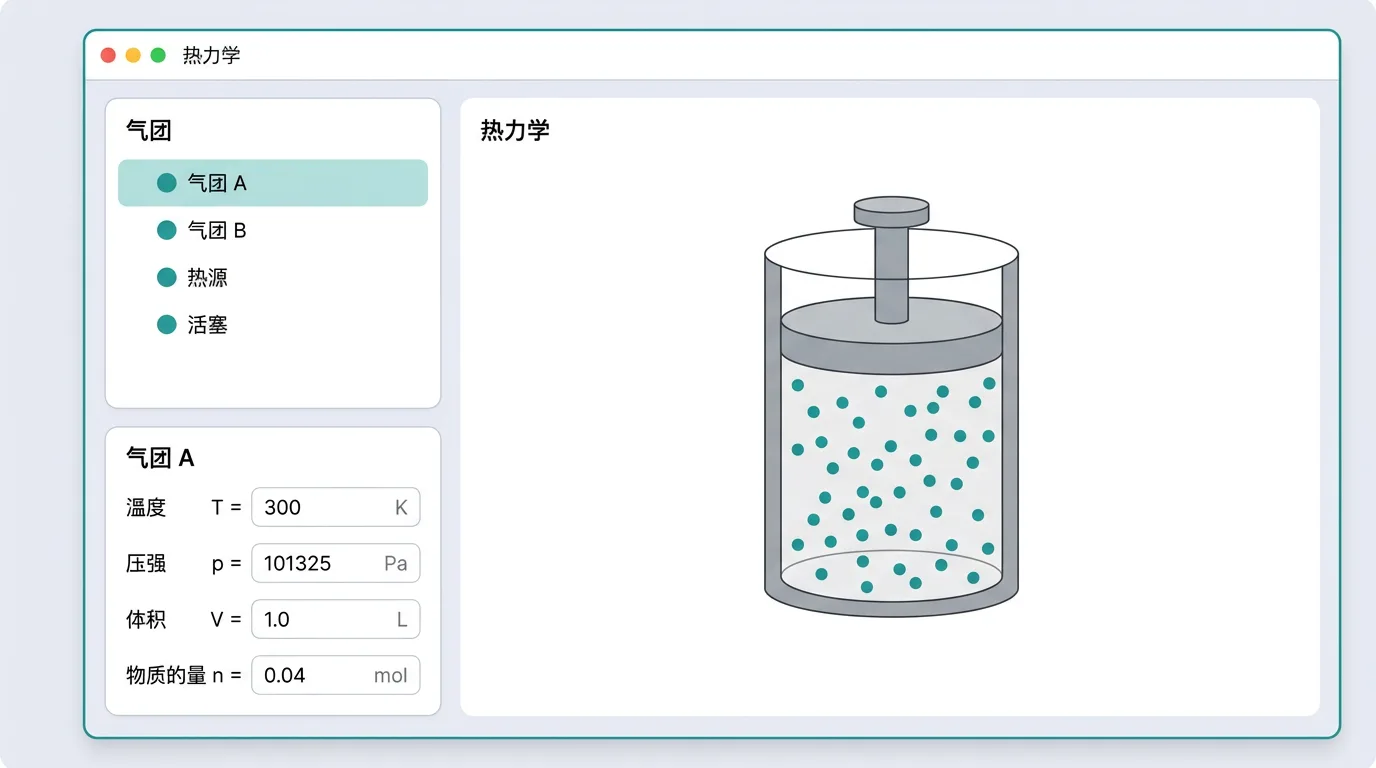
Open the thermal builder (nav bar → Builder → Thermal). The assembly logic of a thermal experiment is: container → gas parcel → process chain. Choose the container type first, then configure the gas's initial state, and finally add the thermodynamic processes in order. You can also load ready-made scenes such as isothermal expansion or a pumping problem from the "Official examples" dropdown on the left and use them as a starting point.
How to Operate
The thermal builder is built around form editing (no canvas dragging): add, remove and edit parcels, containers and processes in the form on the left, while the right side instantly shows the preview, the p-V diagram and the accuracy checks. Tube segments (gas columns, liquid columns, pistons, etc.) are listed from top to bottom in their physical positions along the tube; list order = physical position. The "Run it" button at the top enters the lab and runs the scene.
Scene Settings (All Optional)
The three top-level sections - environment (world), units (units) and analysis settings (analysis) - can all be omitted: not adding = engine defaults (g=9.8, atmospheric pressure 100000 Pa, SI units Pa/m³/K/m, 32 samples per process). When needed, add them with the one-click buttons at the bottom of the builder.
- Environment: gravitational acceleration, atmospheric pressure, etc. Omitted = g=9.8 (textbooks often take 10, which must be entered explicitly), atmospheric pressure 100000 Pa. Note that the atm unit is defined against the standard atmosphere 101325 Pa, which is not the same number as the default atmospheric pressure.
- Units: pressure (Pa/kPa/atm/cmHg/mmHg), volume (m³/L/mL/cm³), temperature (K/℃), length (m/cm/mm). Numbers are written in the chosen unit and the engine performs real conversions (the atm basis is 101325 Pa; cmHg/mmHg use this scene's mercury density × g; ℃ converts by +273.15); a cross-sectional area is read as the square of the length unit. After you switch units, already-entered numbers are not converted automatically - they are reinterpreted in the new unit, so fix the units first and then enter the numbers.
- Analysis settings: samples per process; omitted = 32.
Detailed Entity Reference
Containers
Vessel (fixed volume) · vessel
A rigid steel cylinder/flask; the volume cannot change.
| Parameter | Symbol | Unit | Range | Default | Notes |
|---|---|---|---|---|---|
| Volume | volume | m³ | 0–1 | 0.001 | i.e. 1 L |
| Gas parcel id | parcel | — | — | 0 | The parcel linked to this container |
Notes on use:
- In a fixed-volume container the gas parcel must set pressure (the initial pressure can only come from the parcel: containers and processes define no state quantities, and once V is fixed, p is needed to determine the state)
- Suits isochoric processes (Charles's law )
- Cannot run isobaric/adiabatic processes (the volume cannot change)
Tube (with piston/column) · tube
A one-dimensional tube system: glass tubes sealing gas, mercury columns, pistons, U-tubes, Torricelli.
| Parameter | Symbol | Unit | Range | Default | Notes |
|---|---|---|---|---|---|
| Cross-sectional area | area | m² | 0–0.1 | 0.0001 | Read as (length unit)² (cm² when the length unit is cm) |
| Tube length | length | m | 0–5 | 0.5 | Total length of the tube (unit follows "Unit settings") |
| Tilt angle | angleDeg | ° | −180–180 | 0 | 0 = horizontal, 90 = vertical |
| End closed | closedEnd | — | 0–1 | 0 | 1 = the far end is sealed |
| Start bulb volume | startBulbVolume | m³ | 0–0.01 | 0 | A spherical bulb connected at the tube mouth |
Use cases:
- Vertical tube with sealed gas (mercury-column seal): tilt = 90, end closed
- U-tube: used together with the Rotate container process
- Torricelli experiment: a long tube inverted into a mercury bath
Note on display: the tube's contents (tube segments such as gas columns, liquid columns and pistons) are arranged in order; see the next section.
Submerged bubble · submerged
An underwater bubble / diving bell (a "bubble under the liquid"). The pressure is determined automatically by the depth.
| Parameter | Symbol | Unit | Range | Default | Notes |
|---|---|---|---|---|---|
| Initial volume | volume | m³ | 0–1 | 0.001 | — |
| Depth | depth | m | 0–10 | 1 | Depth below the liquid surface (unit follows "Unit settings") |
| Liquid density | liquidDensity | kg/m³ | 0–20000 | 1000 | Always entered in SI; water = 1000, mercury = 13600 |
Physics: the pressure inside the bubble (atmospheric pressure + liquid-column pressure).
Notes on use: do not set pressure on the gas parcel (the depth determines it). As the bubble rises, the depth decreases → the pressure decreases → the volume expands.
Free gas (p-V diagram) · free
Abstract gas with no apparatus, dedicated to p-V/p-T/V-T graph problems and cyclic processes.
| Parameter | Symbol | Unit | Range | Default | Notes |
|---|---|---|---|---|---|
| Initial volume | volume | m³ | 0–1 | 0.001 | — |
Notes on use:
- Can only be driven by the "Set state" process
- Good for drawing p-V diagrams and computing cycle efficiency
- No physical container constraints needed
Tube Segments (Tube Contents)
A tube connects several tube segments in series from the start end to the far end. Adding, removing and ordering them in the container editor builds cylinders, U-tubes, Torricelli tubes and similar apparatus. Order in the list = physical position along the tube.
Gas column (gas)
A sealed column of ideal gas - the leading actor of in-tube thermodynamics.
| Parameter | Symbol | Unit | Range | Default | Notes |
|---|---|---|---|---|---|
| Gas column length | length | m | 0–5 | 0.2 | Volume = cross-sectional area × length |
Vacuum segment (vacuum)
An empty segment containing no gas, used in Torricelli tubes (vacuum above the mercury column) and similar apparatus.
| Parameter | Symbol | Unit | Range | Default | Notes |
|---|---|---|---|---|---|
| Vacuum segment length | length | m | 0–5 | 0.1 | — |
Liquid column (liquid)
A segment of liquid (mercury/water column); its pressure contribution varies with the tilt: when vertical, 0 when horizontal.
| Parameter | Symbol | Unit | Range | Default | Notes |
|---|---|---|---|---|---|
| Liquid column length | length | m | 0–5 | 0.1 | — |
| Liquid density | density | kg/m³ | 0–20000 | 13600 | Mercury by default; water = 1000 |
Piston (piston)
A piston that slides inside the tube and seals off the gas. At equilibrium .
| Parameter | Symbol | Unit | Range | Default | Notes |
|---|---|---|---|---|---|
| Piston mass | mass | kg | 0–100 | 1 | — |
| External force | externalForce | N | −1000–1000 | 0 | positive = pushing toward the far end |
| Load mass | loadMass | kg | 0–100 | 0 | Weights/sand bucket placed on the piston |
| Piston thickness | thickness | m | 0–0.5 | 0 | The tube length it occupies |
| Max static friction | friction | N | 0–1000 | 0 | Unsticking the piston requires exceeding it |
| Resting stop | resting | — | min/max | min | Rests on the lower/upper stop |
Spring (spring)
A spring pressing on / propping up the piston; spring force .
| Parameter | Symbol | Unit | Range | Default | Notes |
|---|---|---|---|---|---|
| Spring constant | stiffness | N/m | 0–10000 | 100 | i.e. k |
| Relaxed position | relaxedPosition | m | 0–5 | 0 | The position of the free end when the spring is at its natural length |
Bent tube segment (tube_section)
A segment that changes the tube's direction - two segments with different tilts build a U-tube or a V-tube.
| Parameter | Symbol | Unit | Range | Default | Notes |
|---|---|---|---|---|---|
| Segment length | length | m | 0–5 | 0.2 | — |
| Segment tilt | angleDeg | ° | −180–180 | 0 | Angle relative to the horizontal direction |
Liquid bath (reservoir)
A mercury trough / water pool into which the tube mouth is inserted; the liquid in the tube communicates with the bath (Torricelli, siphon).
| Parameter | Symbol | Unit | Range | Default | Notes |
|---|---|---|---|---|---|
| Insertion depth | depth | m | 0–5 | 0.1 | Depth of the tube mouth below the liquid surface |
| Bath density | density | kg/m³ | 0–20000 | 13600 | Mercury by default |
Assembly examples:
- Cylinder (vertical tube + piston): gas column → piston, tube tilt 90°
- Glass tube sealed by gas (mercury plug): gas column → liquid column, end closed, tilt 90°
- U-tube: bent tube segment (−90°) + gas column + liquid column + bent tube segment (+90°) + liquid column
- Torricelli: bath (end boundary = immersed in a liquid bath) + vacuum segment + liquid column
Gas Parcels
Gas parcel (parcel)
A parcel of ideal gas - the core of every thermal experiment.
| Parameter | Symbol | Unit | Range | Default | Notes |
|---|---|---|---|---|---|
| Initial temperature | temperature | K | 0–2000 | 300 | Room temperature is about 300 K (unit follows "Unit settings") |
| Initial pressure | pressure | Pa | 0–1000000 | 100000 | Unit follows "Unit settings"; the default matches the engine's default atmospheric pressure. Note that the atm unit is defined against 101325 Pa, which is a different thing from this default |
| Molar heat capacity Cᵥ | molarHeatCv | J/(mol·K) | 0–50 | 12.47 | Always entered in SI; monatomic =12.47 |
| Molar mass | molarMass | kg/mol | 0–0.1 | 0.029 | Always entered in SI; air 0.029, He 0.004 |
Notes on use:
- The amount of substance is derived automatically from the initial state : ; it is not given by the user
- The initial pressure can only come from the parcel (containers and processes define no state quantities): gas sealed by a cylinder, free gas, a tube closed at both ends, or a piston with friction or resting on a stop must set
pressure; leave it empty where mechanics already fixes the pressure (a submerged bubble, a tube open to the atmosphere or dipping into a bath) - over-specifying raises an "over-determined initial pressure" error - Cᵥ determines : monatomic , diatomic
Processes
Processes run in the order they are added; the final state of one process is the initial state of the next.
Set temperature · heating/cooling (set_temperature)
Slowly heat or cool to the target temperature.
| Parameter | Symbol | Unit | Range | Default | Notes |
|---|---|---|---|---|---|
| Target temperature | temperature | K | 0–2000 | 400 | Final temperature (unit follows "Unit settings") |
Physics: the process path depends on the container type (fixed volume → isochoric heating; piston → isobaric heating).
Set state · process path (set_state)
Graph processes: isothermal / isobaric / isochoric / linear / adiabatic / free expansion. Only usable with free gas.
| Parameter | Symbol | Unit | Range | Default | Notes |
|---|---|---|---|---|---|
| Target pressure | pressure | Pa | 0–1000000 | 100000 | Final p (unit follows "Unit settings") |
| Target volume | volume | m³ | 0–1 | 0.001 | Final V (unit follows "Unit settings") |
| Target temperature | temperature | K | 0–2000 | 400 | Final T; fields unused by the chosen path may be omitted (e.g. isothermal does not need T) |
Use cases:
- Isothermal expansion: increase , keep the temperature at its current value → drops automatically (isothermal accepts no target temperature)
- Isobaric expansion: increase , keep the pressure at its current value → rises automatically (isobaric accepts no target pressure)
- Adiabatic process: give any two of the target values among p/V/T (e.g. increase and give the corresponding final ); the third quantity is computed by the engine from the adiabatic equation
- Cycle: chain several set_state processes into a closed loop
How to chain a cycle (the Carnot cycle as the example): processes run in list order, and the final state of one is the initial state of the next. Steps:
- In the "Process chain" panel, add 4 "Set state" processes one after another
- Process 1 (isothermal expansion): keep the temperature at the initial (isothermal takes no target temperature), increase (e.g. 0.001 → 0.002)
- Process 2 (adiabatic expansion): give two target values - increase further (e.g. → 0.004) + the final temperature
- Process 3 (isothermal compression): keep the temperature at , decrease (e.g. → 0.002)
- Process 4 (adiabatic compression): give two target values - back to its initial value (→ 0.001) + the final temperature , closing the loop
- A closed quadrilateral appears on the p-V diagram at the right; the heats absorbed/released and the efficiency can be viewed under "Accuracy checks" and in the lab
Rotate container (reorient)
Rotate the tube to the target angle.
| Parameter | Symbol | Unit | Range | Default | Notes |
|---|---|---|---|---|---|
| Target angle | angleDeg | ° | −180–180 | 90 | The tube's tilt after rotation; 90 = vertical, 180 = inverted |
Use cases: invert a vertical tube (the mercury column moves from the sealed end to the open end) and analyse the pressure change.
Set atmosphere pressure (set_atmosphere)
Change the ambient atmospheric pressure.
| Parameter | Symbol | Unit | Range | Default | Notes |
|---|---|---|---|---|---|
| Target atmospheric pressure | pressure | Pa | 0–1000000 | 100000 | Unit follows "Unit settings"; note that the atm unit is defined against 101325 Pa |
Use cases: high-mountain experiments (low pressure → low boiling point), pressurising a sealed cabin.
Set frame acceleration · elevator (set_frame_acceleration)
Set the vertical acceleration to simulate gas in an elevator.
| Parameter | Symbol | Unit | Range | Default | Notes |
|---|---|---|---|---|---|
| Vertical acceleration | acceleration | m/s² | −30–30 | 0 | Always entered in SI; positive = upward (overweight) |
Physics: effective gravity . The liquid-column pressure increases when overweight and decreases when weightless.
Apply piston force (set_piston_force)
Change the external force on the piston.
| Parameter | Symbol | Unit | Range | Default | Notes |
|---|---|---|---|---|---|
| Target external force | force | N | −1000–1000 | 0 | Always entered in SI; positive = pushing toward the far end (compression) |
Position piston (set_piston_position)
Push/pull the piston to the target position.
| Parameter | Symbol | Unit | Range | Default | Notes |
|---|---|---|---|---|---|
| Target position | position | m | 0–5 | 0.2 | The piston's distance from the start end (unit follows "Unit settings") |
Release piston (release_piston)
Release the piston slowly and let it settle into a new equilibrium (no oscillation). No parameters.
Load piston · adding sand/weights (set_piston_load)
Slowly add or remove weights on the piston.
| Parameter | Symbol | Unit | Range | Default | Notes |
|---|---|---|---|---|---|
| Target load | loadMass | kg | 0–100 | 0 | Always entered in SI; the total mass on the piston |
Physics: at piston equilibrium (atmospheric pressure + gravity-induced pressure).
Set depth · bubble rising/sinking (set_depth)
Change the depth of the submerged bubble.
| Parameter | Symbol | Unit | Range | Default | Notes |
|---|---|---|---|---|---|
| Target depth | depth | m | 0–10 | 2 | Depth below the liquid surface (unit follows "Unit settings") |
Use cases: a bubble rises from 10 m deep to the surface and its volume expands ( decreases → increases).
Set reservoir depth · pushing/lifting the tube (set_reservoir_depth)
Change how deep the tube mouth sits in the bath.
| Parameter | Symbol | Unit | Range | Default | Notes |
|---|---|---|---|---|---|
| Target depth | depth | m | 0–5 | 0.2 | Unit follows "Unit settings" |
Open valve (open_valve)
Connect two parcels: shared pressure, total amount of substance conserved, each thermally insulated. No parameters.
Physics: after connection , and stays unchanged.
Close valve (close_valve)
Disconnect the two parcels; each keeps the amount of substance it has at that moment. No parameters.
Pumping up · pump in gas (pump_in)
Each stroke pumps gas in isothermally.
| Parameter | Symbol | Unit | Range | Default | Notes |
|---|---|---|---|---|---|
| Volume per stroke | volumePerStroke | m³ | 0–0.01 | 0.001 | The pump barrel's volume (unit follows "Unit settings") |
| Number of strokes | count | — | 1–50 | 5 | The number of pumping strokes |
Use cases: pumping up a bicycle tyre - the pressure rises with each stroke.
Pumping out · pump out gas (pump_out)
Each stroke removes gas via isothermal expansion.
| Parameter | Symbol | Unit | Range | Default | Notes |
|---|---|---|---|---|---|
| Volume per stroke | volumePerStroke | m³ | 0–0.01 | 0.001 | Unit follows "Unit settings" |
| Number of strokes | count | — | 1–50 | 5 | — |
Physics: with each stroke the remaining gas expands isothermally into the container plus the pump barrel volume, and the pressure drops proportionally.
Dispense (dispense)
Fill balloons from a cylinder, each portion drawn off isothermally.
| Parameter | Symbol | Unit | Range | Default | Notes |
|---|---|---|---|---|---|
| Volume per portion | volumePerPortion | m³ | 0–0.01 | 0.001 | The balloon's volume (unit follows "Unit settings") |
| Number of portions | count | — | 1–50 | 5 | How many portions to fill |
Using the Lab
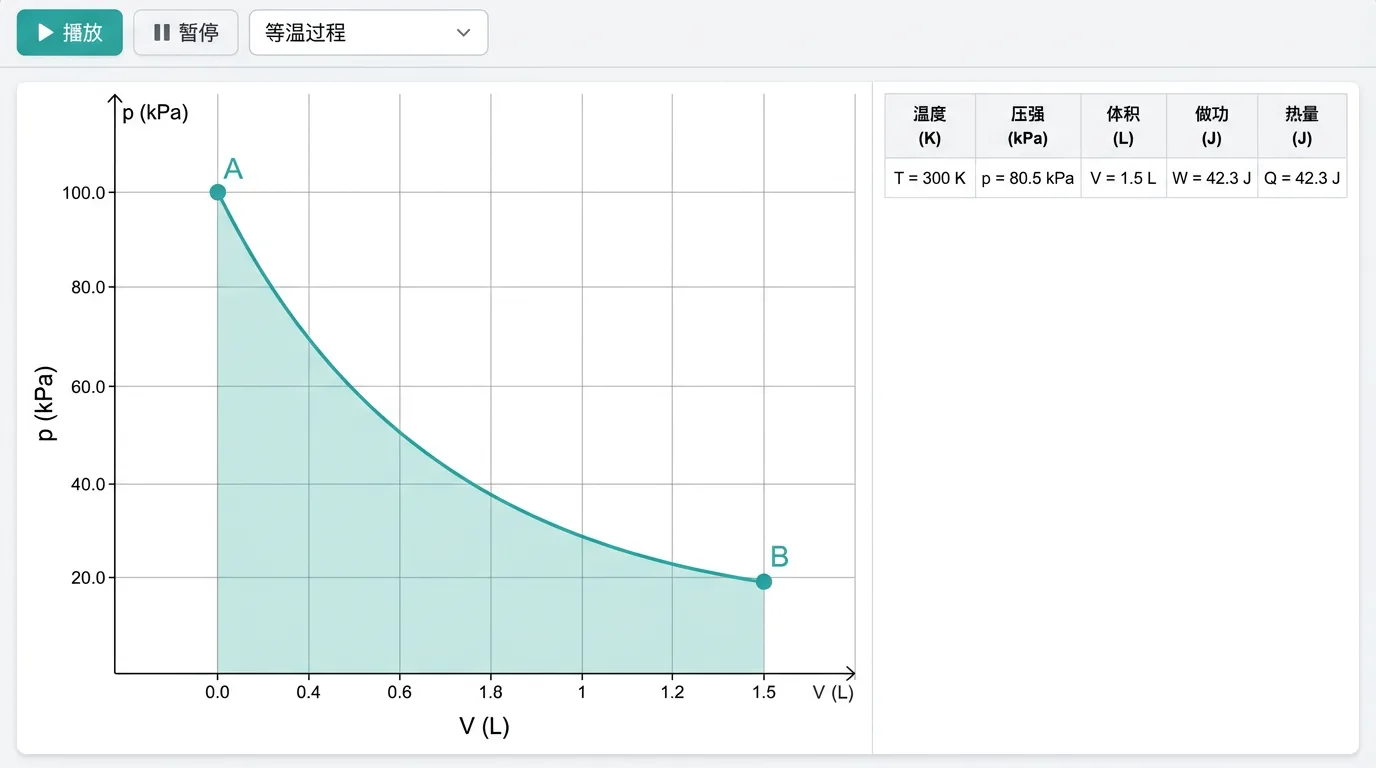
Click "Run it" to enter the lab:
- p-V diagram: process curves drawn in real time; the area under a curve = work
- State data: live , , , ,
- Energy ledger: , , for every process, verifying
- Cycle efficiency:
- Parameter sweep: change the initial temperature / compression ratio and watch the efficiency change
Common Problems and Cautions
- Inconsistent parameters: , , must satisfy . The system validates this automatically. It is recommended to fix (derived from the initial state) and set two of the quantities.
- Sign of work: this system uses , with = work done by the gas on the surroundings. Some textbooks use (where is the work done on the gas by the surroundings), whose signs are reversed.
- Adiabatic ≠ isothermal: the temperature of an adiabatic process changes (heats up on compression, cools down on expansion). "Isothermal" requires contact with a heat reservoir.
- Cycle direction: on the p-V diagram, clockwise = heat engine (positive net work), counter-clockwise = refrigerator.
- Unit conversion: , . Note that the engine's default atmospheric pressure is 100000 Pa, which differs from the atm basis of 101325 Pa; when atmospheric pressure is omitted, calculations use 100000 Pa.
- The initial pressure only comes from the parcel: containers and processes define no state quantities; do not enter an initial pressure for a parcel in apparatus where mechanics already fixes the pressure (submerged bubble, open tube, tube in a bath), otherwise an "over-determined initial pressure" error is reported.
- Fixed-volume container without p: a rigid container must be given pressure, otherwise the state is undetermined.
- Submerged bubble without p: its pressure is computed automatically from the depth (); do not enter an initial pressure (over-specifying raises an "over-determined initial pressure" error).
Teaching Suggestions
- Isothermal verification: free gas + set_state ( constant, doubled) → verify that halves.
- Adiabatic vs isothermal: expand from the same initial state to the same and compare the final and (the adiabat is steeper).
- Carnot cycle: 4 set_state processes (isothermal expansion → adiabatic expansion → isothermal compression → adiabatic compression); compute the efficiency and compare it with .
- Rising bubble: a submerged bubble from 10 m to the water surface; watch the volume expand.
- Pumping problems: rigid container + pump_in; observe that the pressure gain per stroke keeps decreasing.
- U-tube: tube + Rotate container; analyse the direction in which the liquid column moves.
Related Experiments
- Verifying Boyle's law: in an isothermal change
- Charles's law: in an isochoric change
- Gay-Lussac's law: in an isobaric change
- Adiabatic compression: rapid compression heats the gas
- Carnot cycle: a four-step cycle and heat-engine efficiency
- Rising bubble: depth changes → pressure changes → volume changes